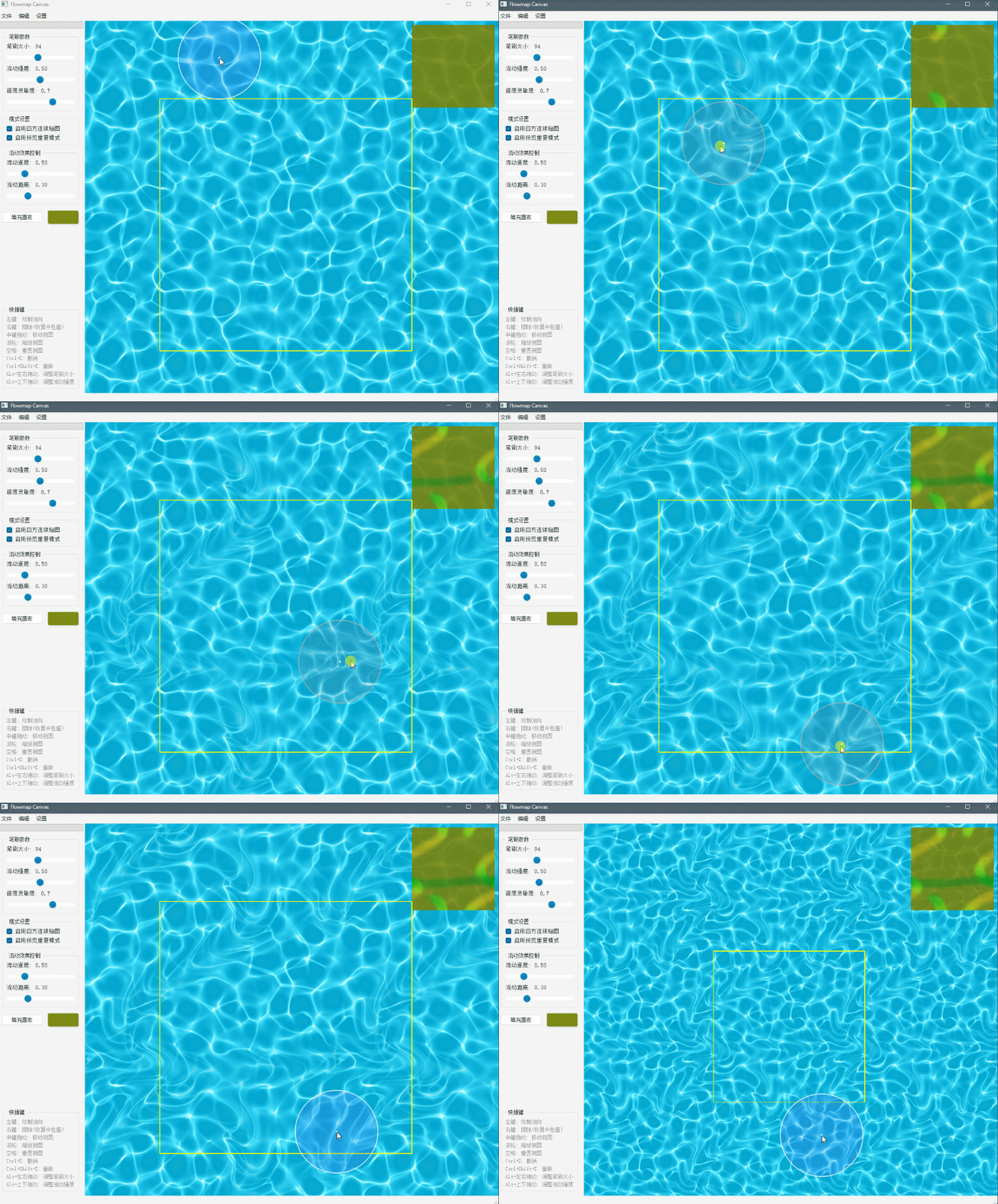
Flowmap Canvas | 流向图画布
Flowmap Canvas
Flowmap Canvas is a powerful and easy-to-use tool for creating and editing flowmaps, designed for game developers, 3D artists, and technical artists.
Why Choose Flowmap Canvas?
Compared to other flowmap editing tools on the market, Flowmap Canvas offers these advantages:
- Open Source & Extensible: Built with Python, making it highly customizable and extensible
- Seamless Texture Support: Create perfectly tileable flowmaps with built-in seamless texture editing
- High-Precision Export: Export flowmaps in high-resolution TGA format for professional use
- Non-Destructive Editing: Unlike FlowmapPainter, our brush system adds to existing flowmaps instead of overwriting them, making it perfect for creating complex flow patterns like river branches
- Real-time Preview: Adjust flow speed and distortion in real-time to achieve the perfect effect
- User-friendly interface: Designed for artists, no programming knowledge required
- Performance optimization: Maintains smooth operation even with high-resolution textures
Flowmap Canvas makes creating flowmaps simple and efficient for both beginners and professional artists.
What is a Flowmap?
A flowmap is a special texture used in game development to control the directional flow of materials, commonly used in:
- Controlling water, lava, and other liquid material directions
- Guiding fabric and hair material directions
- Simulating wind effects
- UV distortion and dynamic texture deformation
Flowmaps typically encode direction vectors in the red and green channels:
- Red channel (R) represents flow in the X direction
- Green channel (G) represents flow in the Y direction
Key Features
Intuitive Drawing System
- Simple and effective flowmap brush tools
- Real-time flow effect preview
- Seamless texture editing support
- High-precision and standard precision modes
Powerful Editing Tools
- Draw and erase tools for precise control
- Canvas navigation with pan and zoom
- Brush size and strength adjustment
- Flow fill functionality
Advanced Preview Features
- Adjustable preview window position
- Tile preview mode support
- Real-time flow animation preview
- Adjustable flow speed and distortion
Comprehensive File Operations
- Load and save flowmaps
- Export to TGA format
- High-resolution export support
Technical Features
- High-performance real-time rendering based on OpenGL
- Modular design with clear code structure
- High-resolution texture processing
- Optimized brush engine for smooth drawing experience
- Support for both DirectX and OpenGL coordinate systems
Setting Up Python Environment
If you want to run from source code rather than using the packaged executable, follow these steps:
Required Environment Setup
You must install Python in the env/Python directory structure:
- Create the environment structure:
mkdir -p env/Python - Install Python 3.9+ into this directory
- Ensure Python executable is at
env/Python/python.exe
Running the Application
- Run
start.batto start the program using the pre-configured environment - Or manually run:
env\Python\python.exe main.py
How to Use
- Run
start.batto start the program - Use left-click to draw flow, right-click to erase
- Use middle-click to drag canvas, scroll wheel to zoom
- Adjust brush properties through the settings panel
- Export as TGA format for use
System Requirements
- Windows 7/8/10/11
- OpenGL 3.2+ support
- Python 3.9+ (if running from source)
- 4GB RAM recommended
- GPU with OpenGL 3.2 support
License
GPL v3 License - See the LICENSE file in the project for details.
流向图画布
流向图画布是一个功能强大、易于使用的流向图(Flowmap)创建和编辑工具,专为游戏开发者、3D艺术家和技术美术工作者设计。
为什么选择流向图画布?
相比市面上其他流向图编辑工具,流向图画布具有以下优势:
- 开源可扩展:使用Python开发,高度可定制和扩展
- 四方连续支持:内置四方连续贴图编辑功能,轻松创建无缝贴图
- 高精度导出:支持导出高分辨率TGA格式,满足专业需求
- 非破坏性编辑:与FlowmapPainter不同,我们的笔刷系统采用叠加模式而不是覆盖模式,特别适合创建复杂的流向图案,如河流支流
- 实时预览:支持实时调整流动速度和扭曲程度,直观预览效果
- 用户友好界面:专为艺术家设计,无需编程知识
- 性能优化:即使处理高分辨率纹理也能保持流畅
流向图画布让流向图的创建变得简单而高效,无论是初学者还是专业艺术家,都能轻松掌握并创建出精美的流向效果。
什么是流向图(Flowmap)?
流向图是游戏开发中使用的一种特殊纹理贴图,用于控制材质的流动方向,常用于以下场景:
- 水流、岩浆等液体材质的方向控制
- 布料、毛发等材质的方向引导
- 风场效果模拟
- UV扰动和动态纹理变形
流向图通常将方向向量编码在红绿通道中:
- 红色通道(R)代表X方向的流动
- 绿色通道(G)代表Y方向的流动
主要功能
直观的绘制系统
- 简单高效的流向笔刷工具
- 实时预览流动效果,直观了解绘制结果
- 支持四方连续(Seamless)贴图编辑
- 支持高精度和标准精度模式
强大的编辑工具
- 绘制和擦除工具提供精确控制
- 画布导航支持平移和缩放
- 可调整笔刷大小和强度
- 支持流向填充功能
高级预览功能
- 可调整预览窗口显示位置
- 支持预览重复(Tile)模式
- 实时流动动画预览
- 可调整流动速度和扭曲程度
完善的文件操作
- 支持加载和保存流向图
- 支持导出为TGA格式
- 支持高分辨率导出
技术特点
- 基于OpenGL的高性能实时渲染
- 模块化设计,代码结构清晰
- 支持高分辨率纹理处理
- 优化的笔刷引擎,支持流畅的绘制体验
- 支持DirectX和OpenGL坐标系统切换
Python环境配置方法
如果您想从源代码运行而不是使用打包好的可执行文件,请按照以下步骤操作:
必要的环境设置
您必须将Python安装到env/Python目录结构中:
- 创建环境结构:
mkdir -p env/Python - 在此目录中安装Python 3.9+
- 确保Python可执行文件位于
env/Python/python.exe
运行应用程序
- 运行
start.bat以使用预配置环境启动程序 - 或手动运行:
env\Python\python.exe main.py
使用方法
- 运行
start.bat启动程序 - 使用左键绘制流向,右键擦除
- 使用中键拖动画布,滚轮缩放
- 通过设置面板调整各种参数
- 导出为TGA格式使用
系统要求
- Windows 7/8/10/11
- OpenGL 3.2+支持
- Python 3.9+(如果从源代码运行)
- 建议4GB RAM
- 支持OpenGL 3.2的GPU
许可证
GPL v3许可证 - 请查看项目中的LICENSE文件了解详情。